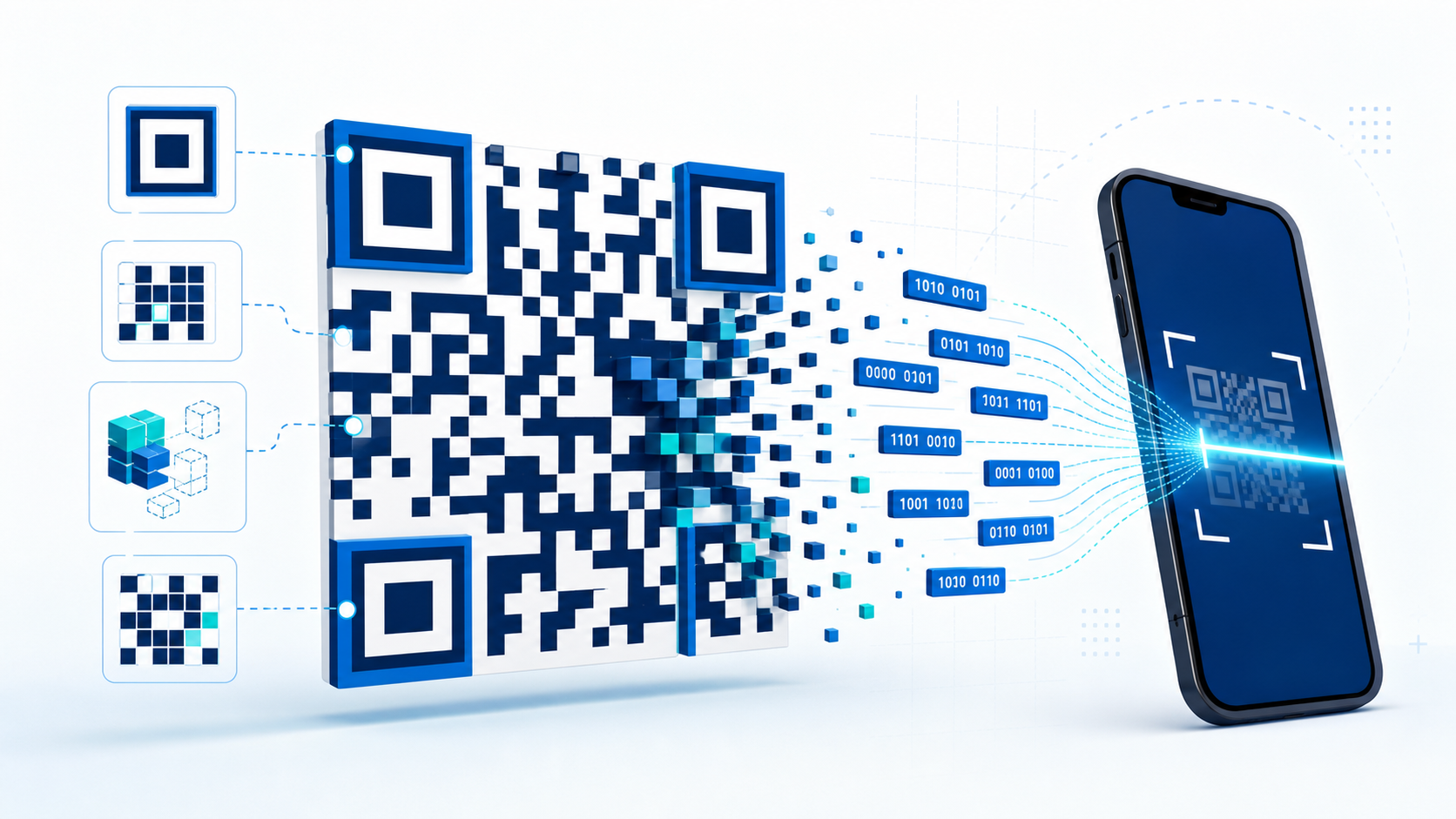
QR codes have become a familiar bridge between the physical and digital worlds. A small square printed on a menu, product package, ticket, or poster can open a website, join a Wi-Fi network, display contact details, or start a payment. The experience feels instant: point a camera at the pattern and the right information appears. Behind that simple interaction is a carefully designed system for encoding, locating, correcting, and decoding data.
What is a QR code?
QR stands for Quick Response. A QR code is a two-dimensional barcode made from a grid of dark and light modules, often described as squares or pixels. Traditional one-dimensional barcodes store information along a single horizontal line. QR codes use both rows and columns, allowing them to hold considerably more data in a compact area.
The content may be a URL, plain text, a telephone number, an email address, Wi-Fi credentials, or another structured value. The QR code does not normally contact a server by itself. It simply stores data. After decoding it, the scanning application decides what action to offer.
How information becomes a QR code
Creating a QR code involves several stages:
Choose an encoding mode. The generator examines the input and chooses an efficient representation. QR codes support numeric, alphanumeric, byte, and Kanji modes. A web address is commonly stored using byte mode.
Convert the content into bits. The selected mode, character count, and actual data are converted into a sequence of binary values.
Add error-correction data. Mathematical recovery information is generated using Reed–Solomon error correction. This allows a scanner to reconstruct missing or damaged portions of the code.
Arrange the bits in a grid. The data and recovery bits are placed into the QR code’s rows and columns around its fixed functional patterns.
Apply a mask. A mask changes selected modules so that the final image avoids confusing patterns, such as large solid areas or repeated stripes.
The generator evaluates the available masks and selects the version that should be easiest for scanners to read.
The important parts of the pattern
A QR code is more than a random collection of squares. Several regions have specific jobs:
Finder patterns: the three large squares near the top-left, top-right, and bottom-left corners. They help the scanner locate the code and determine its orientation.
Alignment patterns: smaller targets that help correct perspective and distortion, particularly in larger QR codes.
Timing patterns: alternating dark and light modules that tell the decoder how the grid is spaced.
Format information: modules that describe the error-correction level and mask pattern.
Quiet zone: the empty margin surrounding the code. It separates the pattern from nearby text and graphics.
Data modules: the remaining squares containing the encoded content and recovery information.
Removing the quiet zone or covering finder patterns can make an otherwise valid code difficult or impossible to scan.
How a phone scans a QR code
When you point a phone camera at a QR code, image-processing software searches the camera frame for the three finder patterns. Once found, it estimates the code’s boundaries and orientation. The software then corrects perspective so a tilted rectangular view can be treated as a straight square grid.
Next, the decoder samples the grid to classify each module as dark or light. It reads the format information, reverses the selected mask, and extracts the data and error-correction blocks. The Reed–Solomon recovery data repairs readable damage, after which the remaining bits are converted back into text or another payload.
Finally, the phone recognizes the content type. For a URL, it displays a link for the user to open. For Wi-Fi details, it may offer to join a network. Good scanners show the destination before taking action rather than opening unknown content automatically.
Why damaged QR codes can still work
QR codes support four error-correction levels: L, M, Q, and H. Higher levels add more recovery data and can tolerate more obstruction, but they also require a denser or larger code for the same content. Approximate recovery ranges are 7 percent for L, 15 percent for M, 25 percent for Q, and 30 percent for H.
This redundancy is why a scratched label may remain readable and why some branded QR codes can contain a small logo. A logo still hides information, however, so it should be kept away from finder patterns and tested across several phones, distances, and lighting conditions.
Static and dynamic QR codes
A static QR code stores its final content directly. If it contains a website address, changing that address requires generating and printing a new code. Static codes are simple and do not depend on a QR management service.
A dynamic QR code usually stores a short redirect URL controlled by a service. The destination can be changed later without replacing the printed pattern, and the service may record scan analytics. The trade-off is dependency: if the redirect service or subscription stops working, the code may stop reaching its destination.
Are QR codes safe?
A QR code is a data container, so it can point to either a legitimate or malicious destination. Treat an unfamiliar QR code like an unfamiliar link. Check the displayed domain before opening it, be cautious when a code asks for credentials or payment, and avoid installing applications from unexpected prompts. Businesses should use clear branding and an HTTPS address on a domain their customers recognize.
Tips for creating a reliable QR code
Use strong contrast, ideally a dark pattern on a light background.
Keep the required quiet zone clear on every side.
Avoid stretching, blurring, or heavily compressing the image.
Use a short URL when possible to produce a less dense pattern.
Print it large enough for the expected scanning distance.
Test the final printed or displayed version, not only the source image.
Create your own QR code
You can use the OpenToolkit QR Code Generator to create QR codes for URLs, text, email, phone numbers, and Wi-Fi details. Generation happens in your browser, making it quick to preview and download the result. Always scan the finished code once before sharing or printing it.
What looks like a simple black-and-white square is therefore a compact communication system. Its recognizable markers locate the grid, binary modules carry the message, masking improves readability, and error correction protects the data. Those pieces work together to make QR codes fast, flexible, and remarkably resilient.